
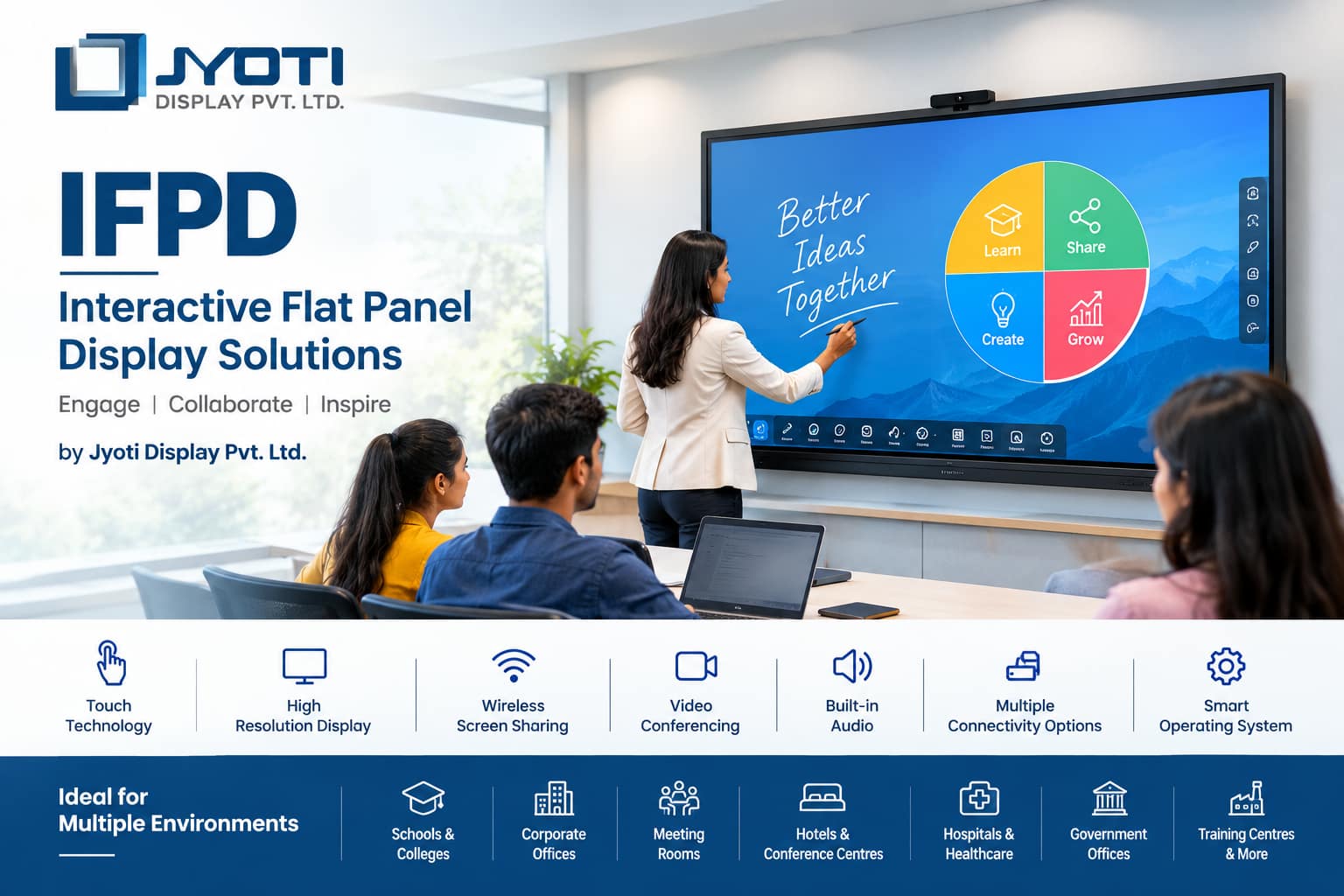
Interactive Flat Panel Displays (IFPD) are transforming the way organizations communicate, collaborate, teach, present, and interact with digital information. Combining a large high-resolution display, touchscreen technology, interactive software, audio, connectivity, and smart computing capabilities in a single solution, IFPDs provide a modern alternative to traditional projectors, whiteboards, and conventional presentation screens.
Jyoti Display Pvt. Ltd. offers customized IFPD solutions for educational institutions, corporate offices, training centres, meeting rooms, conference halls, hotels, healthcare facilities, government organizations, and other professional environments.
An IFPD is not simply a large touchscreen. It is a complete interactive communication platform designed to make presentations and collaboration more engaging, visual, and efficient.
What Is an IFPD?
IFPD stands for Interactive Flat Panel Display.
It is a large-format flat display equipped with touch-sensitive technology that allows users to interact directly with content on the screen.
Depending on the model and configuration, an IFPD can support:
- Touchscreen interaction
- Digital whiteboarding
- Presentations
- Video conferencing
- Screen sharing
- Wireless casting
- Internet browsing
- Document annotation
- Video playback
- Digital teaching
- Corporate collaboration
- Multimedia presentations
- Cloud-based applications
Instead of connecting a computer to a projector and displaying content on a separate screen, an IFPD integrates many of these functions into one professional display system.
Why IFPD Is Becoming Popular
Traditional classrooms and meeting rooms often depend on projectors, whiteboards, computers, speakers, and several cables.
An IFPD can bring many of these functions together.
A presenter can open a presentation, write directly over it, draw diagrams, browse the internet, display videos, share a laptop screen, and save notes—all from the same interactive display.
This makes IFPDs particularly valuable where communication, collaboration, and real-time interaction are important.
IFPD Solutions by Jyoti Display Pvt. Ltd.
Jyoti Display Pvt. Ltd. can provide IFPD solutions designed according to the requirements of different environments.
A professional IFPD project may consider:
- Screen size
- Resolution
- Touch technology
- Touch response
- Brightness
- Viewing angle
- Operating system
- Processor
- RAM and storage
- Connectivity
- Wireless casting
- Audio system
- Mounting arrangement
- Software requirements
- Installation environment
Rather than selecting a display based only on screen size, organizations should consider how the panel will actually be used.
Key Features of Interactive Flat Panel Displays
1. Large High-Resolution Display
IFPDs are available in various screen sizes to accommodate different applications.
Common sizes can include:
- 55-inch
- 65-inch
- 75-inch
- 86-inch
- 98-inch and larger
The appropriate size depends on room dimensions, seating arrangement, viewing distance, and the type of content being displayed.
A training room may require a different size from a large classroom or conference hall.
2. Interactive Touchscreen
Touch functionality is one of the defining characteristics of an IFPD.
Users can interact with content using:
- Fingers
- Styluses
- Digital pens
Depending on the panel technology, multiple users may be able to write or interact with the screen simultaneously.
This makes collaborative activities easier.
For example, a teacher can write on a digital diagram while a student interacts with another part of the screen.
In a corporate meeting, multiple team members can annotate a presentation or work on a digital document.
3. Digital Whiteboard
One of the most useful IFPD applications is digital whiteboarding.
Instead of using a traditional marker and physical whiteboard, users can write directly on the display.
Digital whiteboards can support:
- Handwriting
- Drawing
- Shapes
- Text
- Diagrams
- Erasing
- Page creation
- Saving notes
- Sharing content
This makes meetings and lessons more interactive.
4. Screen Sharing
Modern IFPDs can support wireless or wired screen sharing.
A presenter may be able to share content from:
- Laptop
- Desktop computer
- Smartphone
- Tablet
This can make meetings more flexible because participants do not always need to physically connect their devices to the display.
5. Video Conferencing
IFPDs can be integrated into video conferencing environments.
Depending on the system configuration, the setup may include:
- Camera
- Microphones
- Speakers
- Video conferencing software
- Wireless screen sharing
- Large interactive display
This can make the IFPD a central communication platform for hybrid meetings.
6. Built-In Audio
Many professional IFPDs incorporate speakers.
This allows users to play:
- Videos
- Training material
- Presentations
- Online classes
- Video conference audio
- Multimedia content
For larger rooms, additional professional audio systems may still be appropriate.
7. Multiple Connectivity Options
An IFPD can support different connectivity requirements depending on its model.
Possible interfaces include:
- HDMI
- USB
- USB-C
- LAN
- Wi-Fi
- Bluetooth
- Audio input/output
- Display interfaces
The exact ports vary by manufacturer and model.
For a business installation, connectivity should be selected according to the devices and workflow used by the organization.
IFPD for Schools
Education is one of the most important applications for Interactive Flat Panel Displays.
Traditional teaching can be enhanced through:
- Digital presentations
- Educational videos
- Interactive diagrams
- Online resources
- Digital maps
- Simulations
- Digital handwriting
- Interactive quizzes
- Multimedia lessons
Teachers can move beyond static textbook-based instruction and introduce visual and interactive content.
IFPD for Smart Classrooms
An IFPD can become the central display and interaction system in a smart classroom.
A teacher can:
- Open the lesson.
- Explain the topic using digital content.
- Annotate diagrams.
- Play educational videos.
- Access online resources.
- Conduct interactive activities.
- Save the lesson notes.
- Share the content with students.
This can make the classroom more flexible and visually engaging.
IFPD for Colleges and Universities
Higher education institutions can use IFPDs in:
- Lecture halls
- Classrooms
- Seminar rooms
- Laboratories
- Faculty rooms
- Training centres
- Conference rooms
Engineering, medical, management, design, science, and technical courses can all benefit from interactive digital teaching.
IFPD for Corporate Offices
Corporate organizations can use Interactive Flat Panel Displays for:
- Meetings
- Presentations
- Training
- Brainstorming
- Strategy sessions
- Video conferencing
- Project reviews
- Sales presentations
- Team collaboration
Instead of simply showing a presentation, participants can interact with the information directly.
IFPD for Meeting Rooms
A modern meeting room can combine an IFPD with:
- Video conferencing camera
- Microphone
- Speakers
- Wireless presentation system
- Laptop connectivity
- Collaboration software
This creates a centralized meeting environment.
A presenter can switch between presentation content, video conference participants, documents, and whiteboard activities.
IFPD for Training Centres
Training organizations frequently need to explain complex concepts visually.
An IFPD can support:
- Technical training
- Product training
- Employee training
- Skill development
- Corporate training
- Certification programs
Trainers can annotate presentations and diagrams in real time.
IFPD for Hotels and Conference Centres
Hotels can install IFPDs in:
- Conference rooms
- Training rooms
- Boardrooms
- Business centres
- Seminar halls
They can support corporate meetings, presentations, workshops, conferences, and training programs.
IFPD for Healthcare
Hospitals and healthcare organizations can use interactive displays for:
- Medical presentations
- Training
- Staff meetings
- Patient education
- Conferences
- Clinical discussions
In medical training environments, high-resolution displays can help present detailed diagrams, images, charts, and educational videos.
IFPD for Government Offices
Government departments can use IFPDs for:
- Meetings
- Training
- Presentations
- Public awareness programs
- Administrative discussions
- Video conferencing
Interactive displays can help organizations move toward more digital and collaborative workflows.
IFPD for Design and Engineering
Interactive displays can be particularly useful for design teams.
Engineers and designers can review:
- CAD drawings
- Technical diagrams
- Product designs
- Architectural drawings
- Engineering documents
- 3D models
Team members can annotate designs directly on the screen.
IFPD for Brainstorming
Traditional brainstorming often involves paper, markers, sticky notes, and whiteboards.
An IFPD can bring brainstorming into a digital environment.
Participants can:
- Write ideas
- Draw diagrams
- Add notes
- Move objects
- Organize concepts
- Save the completed session
The digital content can then be shared with participants.
IFPD vs Traditional Projector
| Feature | Traditional Projector | IFPD |
|---|---|---|
| Touch interaction | Usually No | Yes |
| Digital writing | Limited | Yes |
| Built-in display | No | Yes |
| Brightness in normal rooms | Can be affected by ambient light | Generally strong |
| Whiteboard functionality | Separate system | Integrated |
| Screen sharing | Additional equipment may be required | Often supported |
| Maintenance | Lamp/filter may require attention depending on projector | Different maintenance requirements |
| Installation | Projector + screen | Panel mounting |
| Collaboration | Limited | High |
The choice depends on the room and budget, but IFPDs can provide a more integrated interactive experience.
IFPD vs Traditional Whiteboard
A traditional whiteboard is simple and inexpensive, but it cannot independently display videos, presentations, web pages, or digital documents.
An IFPD combines the functions of a display and interactive board.
Traditional Whiteboard
- Writing
- Drawing
- Manual erasing
IFPD
- Writing
- Drawing
- Videos
- Presentations
- Internet
- Documents
- Screen sharing
- Digital annotation
- Saving notes
- Collaboration
This makes IFPD particularly suitable for technology-enabled environments.
IFPD Display Resolution
Resolution is an important specification.
Common modern professional panels can offer high-definition and ultra-high-definition resolutions.
Higher resolution can provide:
- Sharper text
- More detailed images
- Better presentation quality
- Improved diagrams
- More precise visual content
For larger panels and close viewing distances, higher resolution can provide a better experience.
Touch Technology
Different IFPDs can use different touch technologies.
Modern interactive panels commonly employ advanced capacitive or infrared touch systems.
Important specifications can include:
- Number of touch points
- Touch accuracy
- Response time
- Writing smoothness
- Palm rejection
- Pen support
- Multi-user interaction
The correct technology should be selected based on how the display will be used.
Operating System and Smart Features
Some IFPDs include built-in smart operating environments.
Depending on the model, users may be able to access:
- Digital whiteboard
- Web browser
- File management
- Screen casting
- Educational applications
- Productivity applications
- Cloud services
Other systems can connect to external computers or computing modules.
For an organization, compatibility with its existing software environment is important.
Android-Based IFPD
Many modern interactive panels include Android-based environments.
This can provide access to:
- Web browsers
- Whiteboard applications
- Screen sharing
- Multimedia
- File management
- Educational tools
However, the exact Android version, processor, RAM, storage, application compatibility, and update support should be checked before purchasing.
Windows-Based IFPD Applications
Organizations may also connect an IFPD to a Windows computer or OPS-style computing module.
This can provide access to familiar business and educational applications.
Corporate users may use:
- Microsoft Office
- Web applications
- Video conferencing platforms
- Business software
- Presentation software
- Design tools
The final configuration depends on the organization’s requirements.
IFPD for Hybrid Meetings
Hybrid meetings have become increasingly common.
An IFPD can act as the central interface for participants located both inside and outside the meeting room.
A typical setup can include:
IFPD + Camera + Microphone + Speakers + Video Conferencing Software
Participants can see remote colleagues while simultaneously sharing presentations and working on digital whiteboards.
IFPD for Collaboration
Collaboration is one of the strongest advantages of an interactive display.
Team members can work together on:
- Project planning
- Mind maps
- Product concepts
- Business strategies
- Presentations
- Technical diagrams
- Training material
The ability to save and share the resulting content can improve continuity between meetings.
IFPD for Digital Presentations
A presenter can use an IFPD to:
- Open presentations
- Zoom into images
- Highlight information
- Draw annotations
- Switch between applications
- Play videos
- Browse websites
- Share content
This can create a more engaging presentation compared with simply clicking through slides.
IFPD for Product Demonstration
Manufacturers and technology companies can use IFPDs in experience centres and showrooms.
For example, a company can display:
- Product specifications
- Product videos
- Technical diagrams
- Product catalogues
- Interactive demonstrations
Customers can explore information directly on the display.
Customized IFPD Installation
Every location has different requirements.
Jyoti Display Pvt. Ltd. can provide customized solutions involving:
- Wall mounting
- Floor stands
- Mobile stands
- Height-adjustable installations
- Conference room integration
- Classroom installation
- Custom display structures
The mounting arrangement should provide stability and appropriate viewing height.
Professional Installation
Installation should consider:
- Wall strength
- Panel weight
- Viewing height
- Cable management
- Electrical connections
- Network connectivity
- Ventilation
- User accessibility
A professionally installed IFPD provides a cleaner and safer environment.
Maintenance of IFPD
Although IFPDs generally require less routine intervention than some traditional projection systems, regular care is still important.
Maintenance can include:
- Cleaning the screen
- Checking cables
- Checking ports
- Software updates
- Network checks
- Touch calibration where applicable
- Inspecting mounting hardware
- Checking speakers
- Checking external devices
The manufacturer’s maintenance recommendations should always be followed.
Advantages of IFPD for Organizations
Better Collaboration
Multiple participants can interact with the same digital content.
Improved Presentations
Presenters can combine multimedia and live annotation.
Reduced Equipment
An IFPD can consolidate several functions into one system.
Digital Documentation
Meeting or teaching notes can be saved electronically.
Flexible Connectivity
Users can connect laptops and other devices.
Modern User Experience
Touch interaction makes digital content more intuitive.
Long-Term Digital Transformation
IFPDs can support organizations moving toward paperless and digitally collaborative workflows.
How to Select the Right IFPD
Before purchasing an Interactive Flat Panel Display, consider:
1. Screen Size
Select according to room dimensions and audience size.
2. Resolution
Choose a resolution appropriate for presentations, text, diagrams, and multimedia.
3. Touch Performance
Check touch accuracy, responsiveness, and number of simultaneous touch points.
4. Operating System
Consider whether Android, Windows, or a hybrid configuration is most appropriate.
5. Connectivity
Check HDMI, USB, USB-C, LAN, Wi-Fi, Bluetooth, and other required interfaces.
6. Audio
Consider built-in speaker performance and whether external audio is required.
7. Camera and Microphone
For video conferencing, ensure appropriate camera and microphone compatibility.
8. Mounting
Choose a suitable wall mount, trolley, or floor stand.
9. Software
Check compatibility with existing educational or business applications.
10. Service Support
Consider installation, warranty, technical support, and long-term service availability.
Why Choose Jyoti Display Pvt. Ltd. for IFPD Solutions?
An IFPD installation should be considered as a complete solution rather than simply a display purchase.
Jyoti Display Pvt. Ltd. can provide a solution-oriented approach covering:
- Product selection
- Application analysis
- Display configuration
- Installation
- Mounting
- Connectivity
- Integration
- Technical support
Whether the requirement is for a school smart classroom, corporate meeting room, hotel conference hall, training centre, hospital, government office, university, or showroom, the system can be planned according to the intended use.
The Future of Interactive Displays
Interactive displays are becoming an important part of digital workplaces and educational environments.
Future developments are expected to focus on:
- Higher display resolutions
- Improved touch accuracy
- Better wireless collaboration
- AI-assisted productivity
- Cloud integration
- Advanced video conferencing
- Better digital whiteboarding
- Multi-user interaction
- Improved energy efficiency
- More intelligent classroom technology
As organizations increasingly adopt hybrid working and digital education, interactive displays can become an important part of their communication infrastructure.
Conclusion
Interactive Flat Panel Displays are more than large touchscreen monitors. They are integrated digital collaboration platforms that bring presentation, communication, education, annotation, video conferencing, and multimedia into one interactive environment.
For schools, IFPDs can create modern smart classrooms. For businesses, they can transform meeting and training rooms. For hotels and conference centres, they can improve presentations and events. For healthcare organizations, they can support education and communication. For government and professional organizations, they can support digital collaboration and meetings.
The success of an IFPD installation depends on choosing the correct screen size, resolution, touch technology, operating system, connectivity, mounting arrangement, software, and support infrastructure.
Jyoti Display Pvt. Ltd. provides customized IFPD solutions designed to help organizations create modern, interactive, and technology-enabled spaces.
Whether you need an Interactive Flat Panel Display for a school, college, corporate office, conference room, training centre, hotel, hospital, government organization, or showroom, Jyoti Display Pvt. Ltd. can help create a solution aligned with your functional and visual requirements.